How to play StarCraft over the internet without Battle.net
A few colleagues at the university and I, all fans of classic games, decided to play StarCraft: Brood War over the internet. We wanted to create a private game without connecting to Battle.net, but the game didn’t offer a way to specify the server’s IP address. After searching the web and trying several solutions, I found Battle.LAN, a small application that did exactly what we needed.
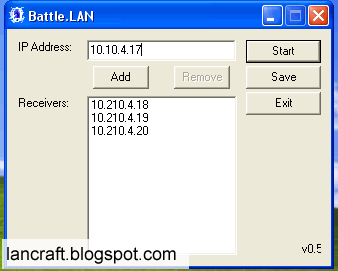
Replacement screenshot from the LanCraft Battle.LAN tutorial. The addresses shown are private; use public IP addresses for internet play.
Here’s how to set it up. The versions covered here are StarCraft: Brood War 1.14 and StarCraft 1.09 or later, using Battle.LAN v0.5 for Windows 2000/XP.
Firewall configuration
Your firewall must allow UDP traffic on port 6111. If you use a GNU/Linux machine as your firewall/router, the following rule forwards incoming traffic on that port to your gaming PC:
iptables -t nat -A PREROUTING -i INTERNET_INTERFACE -p udp \
    --dport 6111 -j DNAT --to-destination INTERNAL_PC_IP
Replace INTERNET_INTERFACE with the interface connected to the internet and INTERNAL_PC_IP with your gaming PC’s LAN address, then run the command on the router as root. The router must also have IP forwarding enabled, and its FORWARD rules must permit this traffic.
Starting the game
- Run Battle.LAN with administrator privileges on every player’s computer, including the host.
- In the IP Address box, enter your public internet IP address and click Add. Repeat this for the public IP addresses of all the other players.
- Click Save, then Start. Leave Battle.LAN running; you can minimize it.
- Start StarCraft or StarCraft: Brood War and select Multiplayer → Local Area Network (UDP).
- Have one player create a game. The other players should see it in the Game list and be able to select it to join.
You can find a Battle.LAN v0.5 download and the original README on GameFront.
Related Posts
2006-04-21
2005-12-27