Restoring deleted files when you have emptied the Recycle Bin
I like to experiment, and last night I was trying SyncToy, a Microsoft PowerToy for Windows XP. It’s a useful utility, and I’ll write a separate review of it. For now, here’s how I recovered some documents after an experiment went wrong.
While experimenting with SyncToy, I accidentally deleted some documents from both my workstation and my laptop. The files went to the Recycle Bin on each PC, but I emptied both bins without a second thought. Moments later, I realized what I had done and started looking for a way to recover my documents.
I searched Windows Help and Support but didn’t find anything useful. Then I opened Firefox and searched Google for “recovering deleted files from the Recycle Bin.” The first result was a guide on Aumha, which linked to a useful utility called Restoration. I downloaded it, scanned the archive with my antivirus software, and extracted it.
Restoration is an MFC application written by Brian Kato. It supports FAT32 and NTFS file systems and doesn’t require installation.
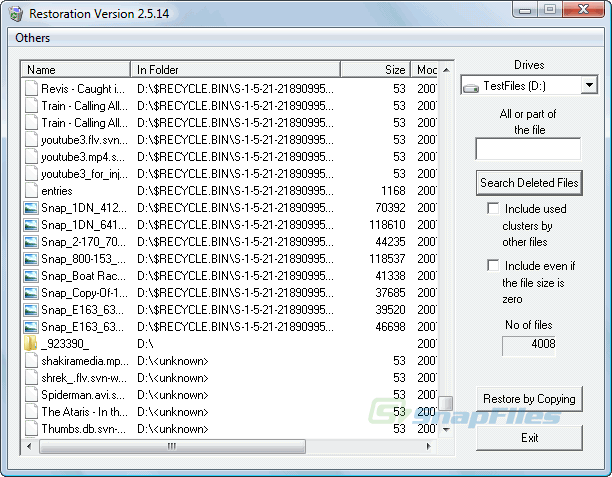
Restoration’s main window. Replacement screenshot from SnapFiles.
Restoring a file
Download and extract Restoration on another drive, then run it from there. Save recovered files to a different drive from the one you’re scanning to avoid overwriting other deleted data.
- Select the drive from which the file was deleted using the Drives list on the right.
- Click Search Deleted Files to search for deleted files. To narrow the search, first enter all or part of the filename in the box above the button.
- Select a file from the results and click Restore by Copying. In the Save dialog, choose a location on another drive and click Save.
- Open the recovered file and check that its contents are correct.
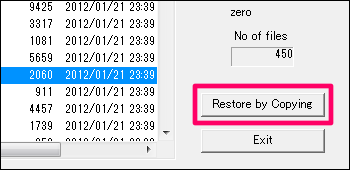
Select a file and click Restore by Copying. Replacement screenshot from FreeSoftLab.
Restoration is freeware. You can download the original utility from Aumha.