Wrapping Claude Code CLI in an OpenAI-Compatible API
Introduction · Skip to setup
I run local AI models about 80% of the time. I occasionally use Codex for tougher software development tasks or to break larger jobs into smaller tasks for my local models.
My setup includes a dedicated AI machine with two NVIDIA Quadro P5000 GPUs (32 GB of VRAM in total), running Ornith 1.5 35B A3B at Q5_K_M through llama.cpp server, with a 256k context window. It’s quite speedy, too: I get around 60-70 tokens/s even with a nearly full context.
I also run Open WebUI for general chats and expose the llama.cpp API through a small PHP wrapper for integrations with Android Studio, VS Code, OpenCode, and the other IDEs I use daily. Ornith can access a couple of local MCP servers that expose my Forgejo instance and Jenkins CI/CD.
The company I work for has a Claude Team subscription. I’m not much of a Claude user, and I’m not particularly fond of it (it gets offended too easily), but as they say, sometimes you just have to deal with it. So, deal with it I did.
Finding a working integration
Attempt 1: Proper integration with Android Studio
As a sane person using the latest and “greatest” Android Studio Rabbit 2:
Android Studio Rabbit 2 | 2026.2.2
Build #AI-262.10968.63.2622.16730706, built on October 27, 2026
Runtime version: 25.0.4+-16339643-b508.27 amd64
VM: OpenJDK 64-Bit Server VM by JetBrains s.r.o.
Toolkit: sun.awt.wl.WLToolkit
Linux 6.12.113+deb13-amd64
Debian GNU/Linux 13 (trixie); glibc: 2.41; desktop: KDE (plasmashell 6.3.6)
I went to Settings > Tools > AI > Agents and tried installing Claude Agent, hoping to get back to actual work. If it had been that simple, this post wouldn’t exist.
The installation got stuck without a useful explanation, even in the logs. Installing the Claude Code CLI and making sure Android Studio could find claude in my $PATH resolved that part.
Then came the next problem: the integrated agent wanted an Anthropic API key, which I didn’t have.
Attempt 2: Asking for an API key
This was a short one. API keys weren’t included in our company’s plan.
Attempt 3: Claude Code CLI and the Android Studio plugin
The Claude Code plugin for Android Studio is essentially a terminal running the CLI inside the IDE. It works, but it feels like using a terminal from 20 years ago. I wanted a proper Agent chat with IDE tools, not a terminal pretending to be an integration.
Attempt 4: Using my local LLM as a proxy for Claude Code
After completing two tasks through the Claude Code plugin, I started looking for alternatives that were a little more on the hacky side.
My first idea was a small MCP server that would let Ornith delegate requests to claude -p. Building an MCP bridge was the easy part.
The awkward part was keeping Ornith in the middle: it would still have to decide when to call Claude and how to handle tool calls. I wanted Claude behind Android Studio’s Agent interface, not another agent supervising it. That made the MCP approach a poor fit.
Attempt 5: Wrapping Claude Code CLI in an API
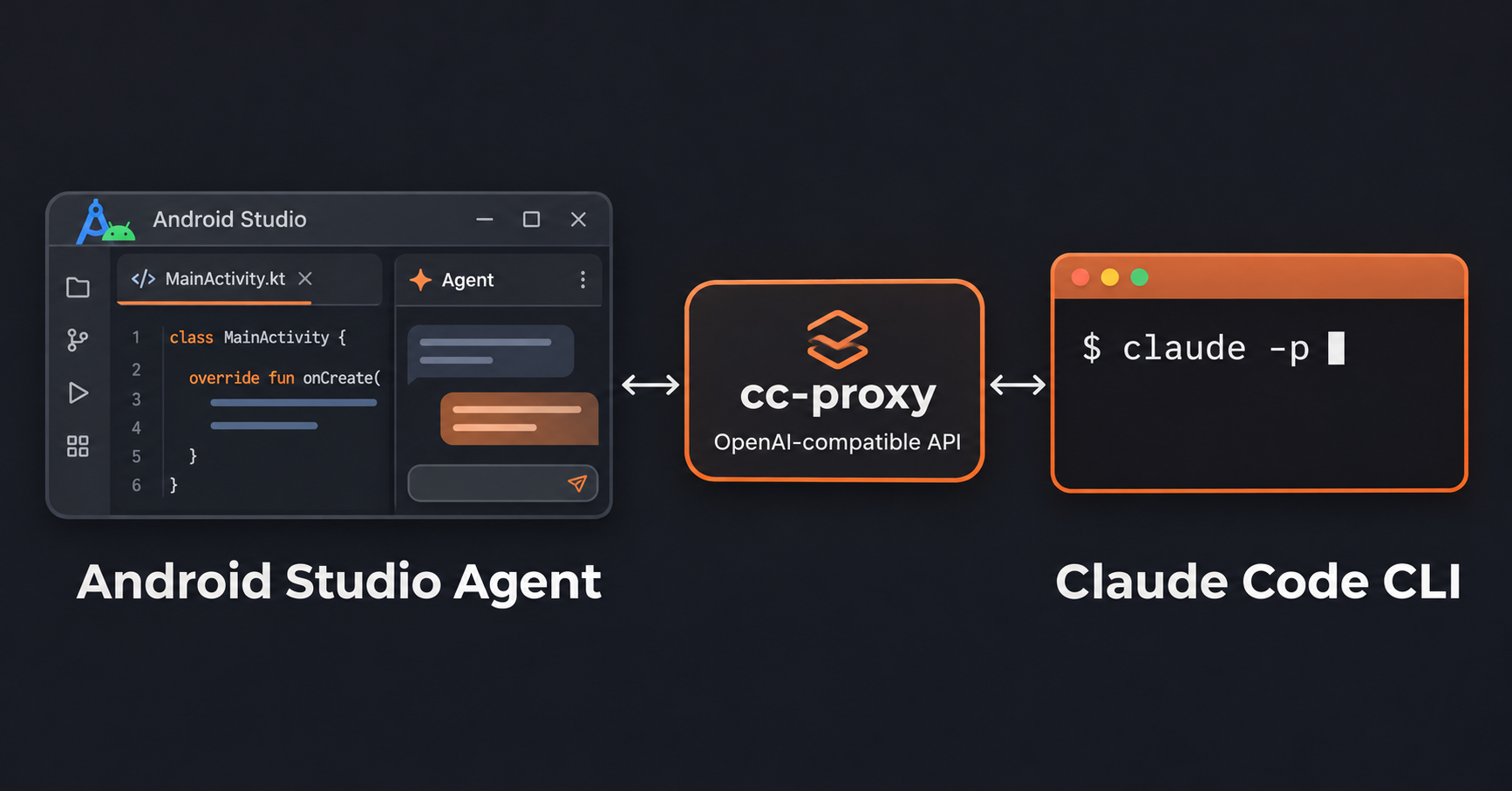
That led to a better question: could I wrap claude -p in an OpenAI-compatible endpoint and connect it to the tools I already use, including Android Studio and VS Code?
Before building yet another service myself, I did some searching and found cc-sdk-go.
The repository describes itself as:
Turn your Claude Code subscription into an OpenAI-compatible API. One binary. Zero config. Pure stdlib.
In short, it exposes the authenticated Claude Code CLI through an OpenAI-compatible HTTP API.
The installation was straightforward, apart from two Android Studio compatibility bugs I’ll get to later.
Set up cc-proxy
Compatibility:
cc-proxyprovidesPOST /v1/chat/completions(streaming and non-streaming) andGET /v1/models. For tool calls, it adds instructions to the prompt and parses Claude’s<tool_call>output into OpenAI-styletool_calls. Parameters such astemperature,top_p,stop, andnare accepted but aren’t forwarded to the Claude Code CLI.
Versions used for this setup:
| Component | Version |
|---|---|
Go toolchain used to build cc-proxy |
1.25.6 |
| Claude Code CLI | 2.1.318 |
cc-sdk-go base commit |
7ee389b12a4f, with the two patches described below |
1. Clone, patch, and install cc-proxy
You’ll need Go 1.25.6 or newer and a working, authenticated Claude Code CLI.
git clone https://github.com/codewandler/cc-sdk-go.git
cd cc-sdk-go
git checkout --detach 7ee389b12a4fc8988d31590f5413c51fc1747085

curl -fL -o cc-sdk.patch https://paskov.vmsoft-bg.com/downloads/cc-sdk.patch
git apply --check cc-sdk.patch
git apply cc-sdk.patch
Install the patched proxy:
go install ./cmd/cc-proxy
export PATH="$(go env GOPATH)/bin:$PATH"
My patch fixes missing streaming tool-call indices and adds support for OpenAI developer messages. The commands above pin the repository to the base commit used in my setup. If you choose a newer revision that already includes both fixes, skip the patch download and the two git apply commands.
2. Generate a local API key
Generate the key and print its value:
export CC_PROXY_API_KEY="$(openssl rand -hex 24)"
echo "$CC_PROXY_API_KEY"
Copy the value printed by echo "$CC_PROXY_API_KEY" before starting the proxy. You’ll use this same key in the curl requests and in Android Studio.
This key authenticates clients to your local proxy. It is not an Anthropic API key.
3. Launch the proxy
Run the following command in the same terminal where you generated the key, so the proxy can read CC_PROXY_API_KEY:
cc-proxy \
    -addr=127.0.0.1:8080 \
    -model=sonnet \
    -claude-path="$(command -v claude)" \
    -max-concurrent=2 \
    -timeout=10m
Note: Run
cc-proxy --helpto see all available options. Binding to127.0.0.1keeps the endpoint accessible only from the local machine.
4. Test that everything works
Leave the proxy running and open a second terminal for the test requests. The new terminal won’t automatically inherit CC_PROXY_API_KEY from the first one, so use the copied key directly in the Bearer authorization header.
In both commands below, replace YOUR_LOCAL_API_KEY with the exact value printed by echo "$CC_PROXY_API_KEY" in step 2.
First, list the available models:
curl http://127.0.0.1:8080/v1/models \
    -H "Authorization: Bearer YOUR_LOCAL_API_KEY"
The response should list the available models, including sonnet, haiku, and opus in my setup.
Next, try a normal chat completion:
curl http://127.0.0.1:8080/v1/chat/completions \
    -H "Content-Type: application/json" \
    -H "Authorization: Bearer YOUR_LOCAL_API_KEY" \
    -d '{
      "model": "sonnet",
      "messages": [
        {
          "role": "user",
          "content": "Reply with exactly: Hello from Claude"
        }
      ],
      "stream": false
    }'
If all goes well, the response should contain Hello from Claude.
5. Configure Android Studio
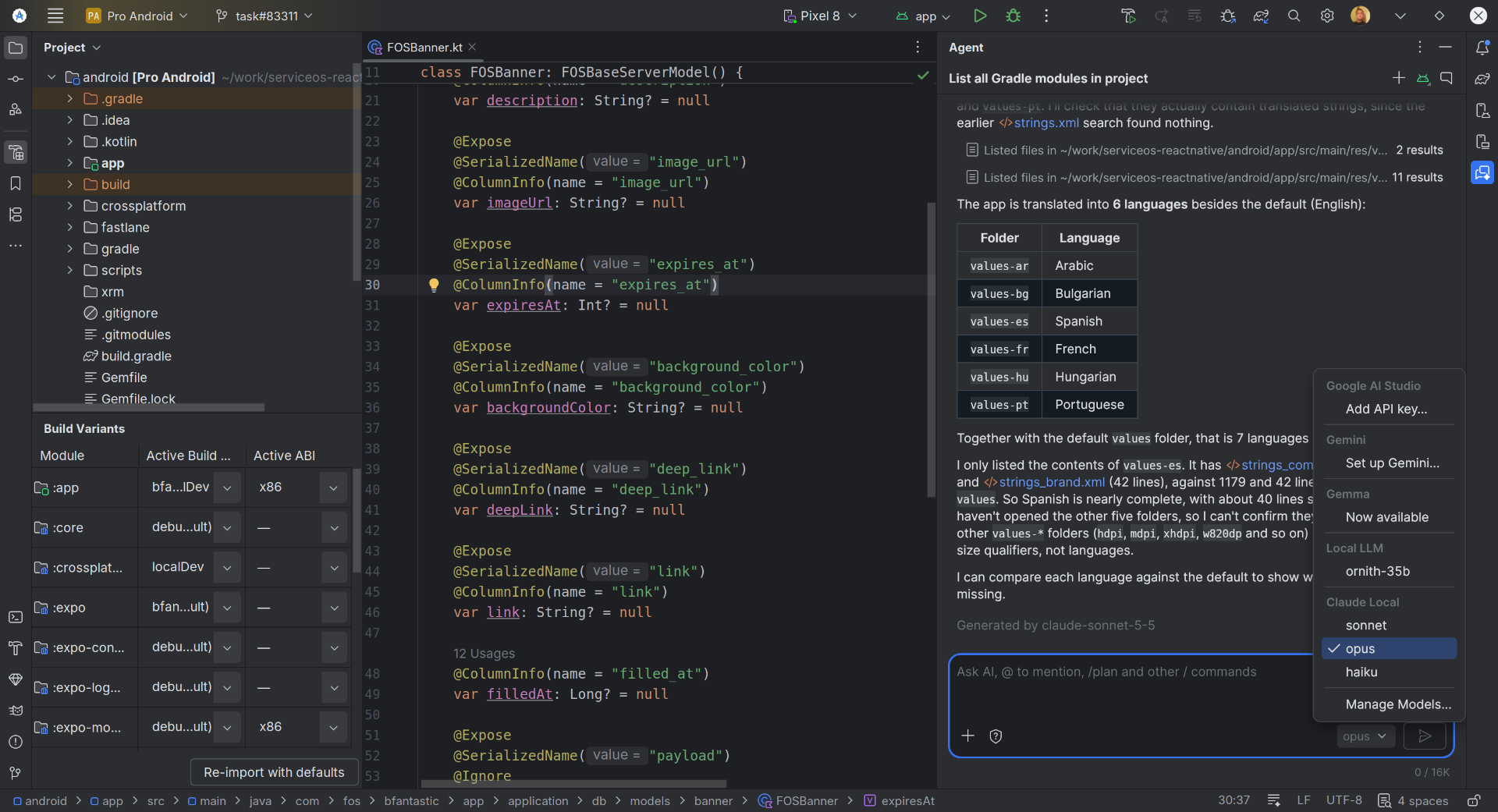
Go to Settings > Tools > AI > Model Providers, add a Third-Party Remote Provider, and configure it as follows:
| Setting | Value |
|---|---|
| Provider Name | Claude Local |
| URL | http://127.0.0.1:8080/v1 |
| URL Schema | OpenAI-compatible |
| API Key | Same key copied in step 2 |
Under Available Models, select the models you want. Then open Android Studio’s Agent chat and select one of the models exposed by Claude Local.
Fixing two bugs in cc-proxy
Getting Android Studio working required two small compatibility fixes. Tracking them down turned out to be the most interesting part of the experiment.
Patch 1: Model query failed: index is not set
My first curl chat request worked, but Android Studio’s Agent immediately failed with:
Model query failed: index is not setThat turned out to be a mismatch in OpenAI’s streaming tool-call format. The proxy emitted a tool call with an ID, name, and arguments, but without the required index field. To confirm it, I sent a streaming chat request with a dummy ping function and inspected the returned delta.tool_calls.
The response was effectively:
{
  "id": "call_123",
  "type": "function",
  "function": {
    "name": "ping",
    "arguments": "{\"value\":\"hello\"}"
  }
}
Android Studio expected that same tool call to include "index": 0.
The fix was in two places. In oai/request.go, we added an index to ToolCall:
Index *int `json:"index,omitempty"`Using *int matters: a plain integer with omitempty would drop the first call’s index because its value is zero. In oai/bridge_stream.go, FinishChunk() now assigns an index to each tool call before serializing the streaming chunk:
for i := range toolCalls {
    index := i
    toolCalls[i].Index = &index
}
After rebuilding the proxy, the same test returned "index": 0, and Android Studio’s Agent started accepting tool calls.
Patch 2: Every conversation title started with “I can’t…”
With tool calls working, I noticed another strange bug: Android Studio’s conversation titles almost all started with “I can’t…”. The conversations themselves worked fine; only their titles were nonsense.
To see what Android Studio was sending, I captured the local HTTP requests to the proxy using tcpdump. That revealed a separate title-generation request.
Its developer message instructed the model to turn the user’s question into a short, 5-10-word title, while its user message contained the actual question, such as “List all gradle modules in this project”.
The culprit was in oai/bridge_request.go: RequestToQuery() recognized system messages but ignored developer messages entirely. So Claude never saw the summarization instruction and tried to answer the question instead. Hence the “I can’t…” titles.
The fix was small:
// Before
case "system":
    systemParts = append(systemParts, msg.StringContent())

// After
case "system", "developer":
    systemParts = append(systemParts, msg.StringContent())
Android Studio also uses developer messages for agent instructions, IDE tool descriptions, and project context. The proxy had been dropping those along with the title-generation instructions. The same fix takes care of both.
The result
I now have Claude running in Android Studio’s native Agent chat through a local OpenAI-compatible endpoint. The proxy launches the authenticated Claude Code CLI, so there’s no separate Anthropic API key involved. The same endpoint can also be configured in other clients that support the OpenAI chat-completions API.