iPod nano and GNU/Linux
My brother bought himself a 1 GB iPod nano.
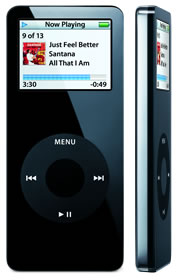
I love the smooth lines and the color, but I don’t like the accompanying software. iTunes didn’t like some of the songs, and I found the installation process annoying because it asked for personal information. According to Apple, this information was only needed to improve customer support. After some testing on Windows XP, I brought the iPod home to try it on my Gentoo Linux system.
Thanks to the combination of D-Bus, HAL, and GNOME Volume Manager, the iPod was detected and mounted as soon as I plugged it in. The setup wasn’t perfect, though: I still had trouble keeping entries in /etc/fstab for my floppy and CD-R/RW/DVD-R drives while also using GNOME Volume Manager.
Here’s the output of tail -f /var/log/messages:
Jul 9 15:45:54 localhost kernel: usb 1-1: new full speed USB device using uhci_hcd and address 3
Jul 9 15:45:54 localhost kernel: usb 1-1: configuration #1 chosen from 2 choices
Jul 9 15:45:54 localhost kernel: scsi0 : SCSI emulation for USB Mass Storage devices
Jul 9 15:45:55 localhost usb.agent[9864]: Keeping default configuration with /sys//devices/pci0000:00/0000:00:1f.2/usb1/1-1
Jul 9 15:45:59 localhost kernel: Vendor: Apple Model: iPod Rev: 1.62
Jul 9 15:45:59 localhost kernel: Type: Direct-Access ANSI SCSI revision: 00
Jul 9 15:45:59 localhost kernel: SCSI device sda: 1999871 512-byte hdwr sectors (1024 MB)
Jul 9 15:45:59 localhost kernel: sda: Write Protect is off
Jul 9 15:45:59 localhost kernel: SCSI device sda: 1999871 512-byte hdwr sectors (1024 MB)
Jul 9 15:45:59 localhost kernel: sda: Write Protect is off
Jul 9 15:45:59 localhost kernel: sda: sda1 sda2
Jul 9 15:45:59 localhost kernel: sd 0:0:0:0: Attached scsi removable disk sda
Once the device was detected and mounted, I could browse it like an ordinary USB memory stick. However, simply copying MP3 files onto it isn’t enough to add them to its music library: the iPod’s music database also needs to be updated. I searched Portage for an iPod manager:
emerge -S iPodThe search led me to gtkpod:
emerge -av gtkpodAfter a few minutes of compilation and configuration, I could browse the iPod, upload and download songs, and play them directly from the device. I’ll cover gtkpod configuration in another post.
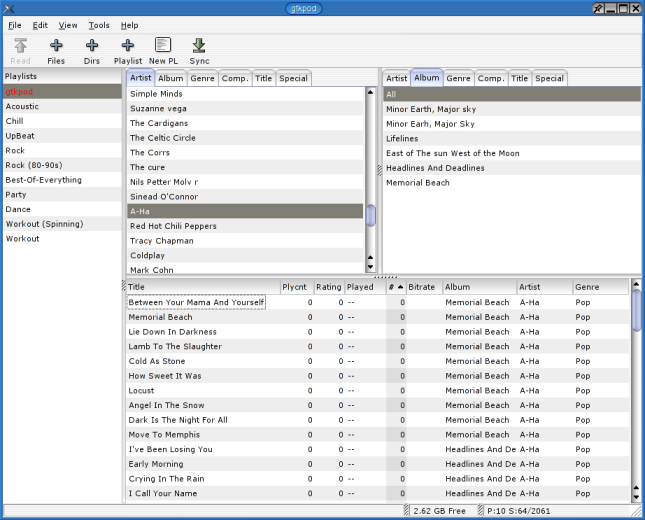
Screenshot from the gtkpod project archive.

gtkpod is a cool application. When I have time, I’ll probably contact the author to discuss possible improvements to the interface and, if they agree, offer to implement them.
Related Posts
2005-07-05
2006-05-08
2006-04-21